
Best overall for connected HFM queries: EPM Copilot. Best for reviewing supplied report extracts: Claude. Best for drafting variance commentary: ChatGPT. Best for Excel-based reporting assistance: Microsoft 365 Copilot. This 2026 guide separates direct Oracle HFM access from tools that work on data you provide.
- Among the best ai tools for oracle hfm reporting, EPM Copilot fits teams seeking connected, plain-language queries.
- Claude suits supplied HFM extracts; ChatGPT suits draft variance commentary from approved figures.
- Microsoft 365 Copilot suits Excel-centered reporting, not an assumed native HFM connection.
- Evaluate source traceability, dimensional context, access controls, and correction handling before approving reporting use.
Why this matters
An assistant that explains an uploaded workbook is not the same as an assistant connected to HFM. Both support reporting, but they solve different problems and create different control requirements.
For your 2026 shortlist, start with the reporting handoff you want to remove: retrieving figures, interpreting an extract, writing commentary, or working inside Excel. Choose EPM Copilot for Oracle HFM reporting when your requirement is a connected, plain-language interface rather than another export-analysis step.
Keep HFM as the financial source of record. Treat generated explanations as reviewable work, not evidence that the underlying consolidation or reporting process is correct.
What makes the best AI tools for Oracle HFM reporting
Use these criteria before comparing product names:
- Data access: Distinguish an HFM connection from an uploaded file. Require a demonstration of the exact retrieval workflow you need.
- Dimensional context: Preserve entity, account, period, scenario, currency, and other relevant POV details in questions and answers.
- Source traceability: Require enough source detail to reconcile every reported figure against an approved report or retrieval result.
- Access boundaries: Establish which identities, permissions, data-handling terms, and deployment settings govern the workflow.
- Reporting fit: Separate financial retrieval, analysis, commentary, and spreadsheet assistance rather than expecting one interface to replace every step.
- Correction handling: Test whether the assistant incorporates a corrected input without repeating the original error elsewhere.
A polished paragraph is not a substitute for a correct reporting POV. Reject an answer that mixes periods or currencies even when its explanation sounds plausible.
Oracle HFM reporting tools at a glance
The 2026 comparison below ranks each option by its assigned reporting task. Only the first option has an HFM connection explicitly described here; the others are assessed as assistants for supplied information or existing workbooks.
| Rank and tool | Best for | Standout capability | Key limitation |
|---|---|---|---|
| 1. EPM Copilot | Connected HFM questions | MCP servers connect assistants to Oracle EPM, including HFM | Validate the exact HFM operations required by your reporting workflow |
| 2. Claude | Reviewing supplied report extracts | File-based analysis and explanation | A supplied extract is not a live HFM connection |
| 3. ChatGPT | Drafting variance commentary | Turning provided facts into structured explanations | Fluent commentary does not establish the cause of a variance |
| 4. Microsoft 365 Copilot | Excel-based reporting assistance | Assistance within the Microsoft 365 workflow | Excel assistance does not itself establish HFM connectivity |
These are distinct use-case recommendations, not results from a controlled performance benchmark. Evaluate each against your own approved reporting pack before selecting a production workflow.
1. EPM Copilot: best for connected HFM reporting queries
EPM Copilot builds MCP servers that connect Claude and other assistants to Oracle EPM modules, including HFM. Finance teams can query and operate those systems in plain language, with deployment inside their network.
That makes the product the closest fit when your primary problem is the handoff between an HFM question and the system holding the answer. The important distinction is the connection—not whether another assistant can produce a similar-looking paragraph from an export.
Manual today: Retrieve the relevant HFM output, transfer the figures into your analysis workflow, and explain the reporting POV again.
Proposed connected workflow to validate: Ask for the required figures through the assistant, then inspect the retrieved context before requesting commentary. A useful demonstration prompt is: “Compare the approved actual and budget figures for this entity and period, and show the reporting context used.”
That prompt is an acceptance test, not a claim that every requested operation is already exposed. Require the demonstration to use your relevant dimensions and reporting rules.
EPM Copilot pros:
- Explicitly includes HFM within its Oracle EPM scope.
- Connects assistants through MCP rather than relying only on uploaded extracts.
- Supports deployment inside your network.
EPM Copilot cons:
- The HFM scope alone does not establish support for every report, calculation, or operational task.
- A connected workflow still needs identity, permission, and financial-output validation.
Best for: Finance and IT teams whose requirement is plain-language access to HFM itself.
Verdict: Buy for a connected-query requirement after validating the required HFM operations.
2. Claude: best for reviewing supplied HFM report extracts
Claude is a useful option when you already have an approved reporting extract and want help interpreting its contents. Keep the task bounded: identify differences, summarize supplied information, or explain a table using the definitions you provide.
Do not confuse this workflow with the connected deployment above. A file-analysis session sees the material supplied to that session; it does not establish a current HFM balance or retrieve omitted reporting context by itself.
A practical prompt is: “Use only this approved extract. Summarize the actual-versus-budget differences, preserve the reporting currency, and list any missing definitions before explaining results.” Provide the account mapping and sign convention alongside the figures.
Claude pros:
- Works as an analysis assistant for supplied documents and tabular information.
- Supports follow-up questions about the material under discussion.
- Fits review tasks where an approved extract already exists.
Claude cons:
- The extract creates a reporting boundary; changes in HFM are not automatically reflected in the supplied file.
- Missing dimension labels or business definitions weaken the interpretation.
Best for: Controllers and analysts reviewing a defined reporting pack without requiring direct system operations.
Verdict: Buy for bounded extract review; skip it as a standalone HFM connection.
3. ChatGPT: best for drafting HFM variance commentary
ChatGPT fits the writing stage after you have approved the figures and established the business explanation. Supply the variance, the reporting context, and the confirmed driver; ask for a concise management narrative rather than an open-ended diagnosis.
The distinction matters because arithmetic differences do not establish causation. A revenue movement does not prove that volume, mix, timing, or foreign exchange caused it unless the supporting evidence is present.
Use a prompt such as: “Draft commentary from these approved figures and confirmed drivers. Separate observed changes from management explanations. Do not introduce causes, actions, or forecasts that are absent from the input.”
For a 2026 reporting pack, agree on the commentary structure before drafting. A repeatable structure makes omissions easier to identify than a fresh narrative format for every entity.
ChatGPT pros:
- Converts supplied facts into structured draft commentary.
- Supports revisions for audience, terminology, and length.
- Helps separate a numerical observation from a supplied management explanation.
ChatGPT cons:
- Generated wording requires checking against the approved figures and drivers.
- A drafting session does not establish direct HFM access or financial approval.
Best for: FP&A and controllership teams that already know what happened and need a reviewable first draft.
Verdict: Buy for controlled commentary drafting; skip unsupported causal explanations.
4. Microsoft 365 Copilot: best for Excel-based reporting assistance
Microsoft 365 Copilot belongs on the shortlist when your reporting work already centers on Excel. Evaluate it for assistance with the workbook in front of you, rather than treating the product name as proof of an HFM integration.
Keep the boundary explicit: the workbook contains the supplied reporting data; HFM remains the source system. Test assistance against the workbook's actual tables, formulas, and reporting conventions before adopting a recurring process.
A suitable evaluation request is: “Explain the variance table in this workbook, identify the formulas used, and distinguish workbook calculations from supplied source values.” Review the explanation against the workbook rather than accepting the narrative alone.
Microsoft 365 Copilot pros:
- Fits teams that conduct reporting work in Excel.
- Keeps spreadsheet assistance close to the workbook being reviewed.
- Offers an alternative to moving every workbook task into a separate chat workflow.
Microsoft 365 Copilot cons:
- Workbook assistance does not itself provide an HFM connection.
- Incorrect formulas, incomplete extracts, and missing definitions still require correction.
Best for: Reporting owners whose immediate requirement is help with an existing Excel workflow.
Verdict: Buy for workbook assistance; hold if your actual requirement is direct HFM retrieval.
How we ranked these options
The ranking follows the distance between your question and the approved financial source. Connected HFM access comes first for a system-query requirement; extract analysis, commentary drafting, and workbook assistance follow as separate tasks.
The criteria are data access, dimensional context, traceability, access boundaries, reporting fit, and correction handling. No speed, accuracy, or productivity score is assigned without a measured comparison.
Run a controlled reporting evaluation
For your 2026 evaluation, use 1 approved entity, 2 reporting periods, and 3 required outputs: a source-aligned table, a variance explanation, and a list of unresolved questions. These are suggested test boundaries, not product capacity claims.
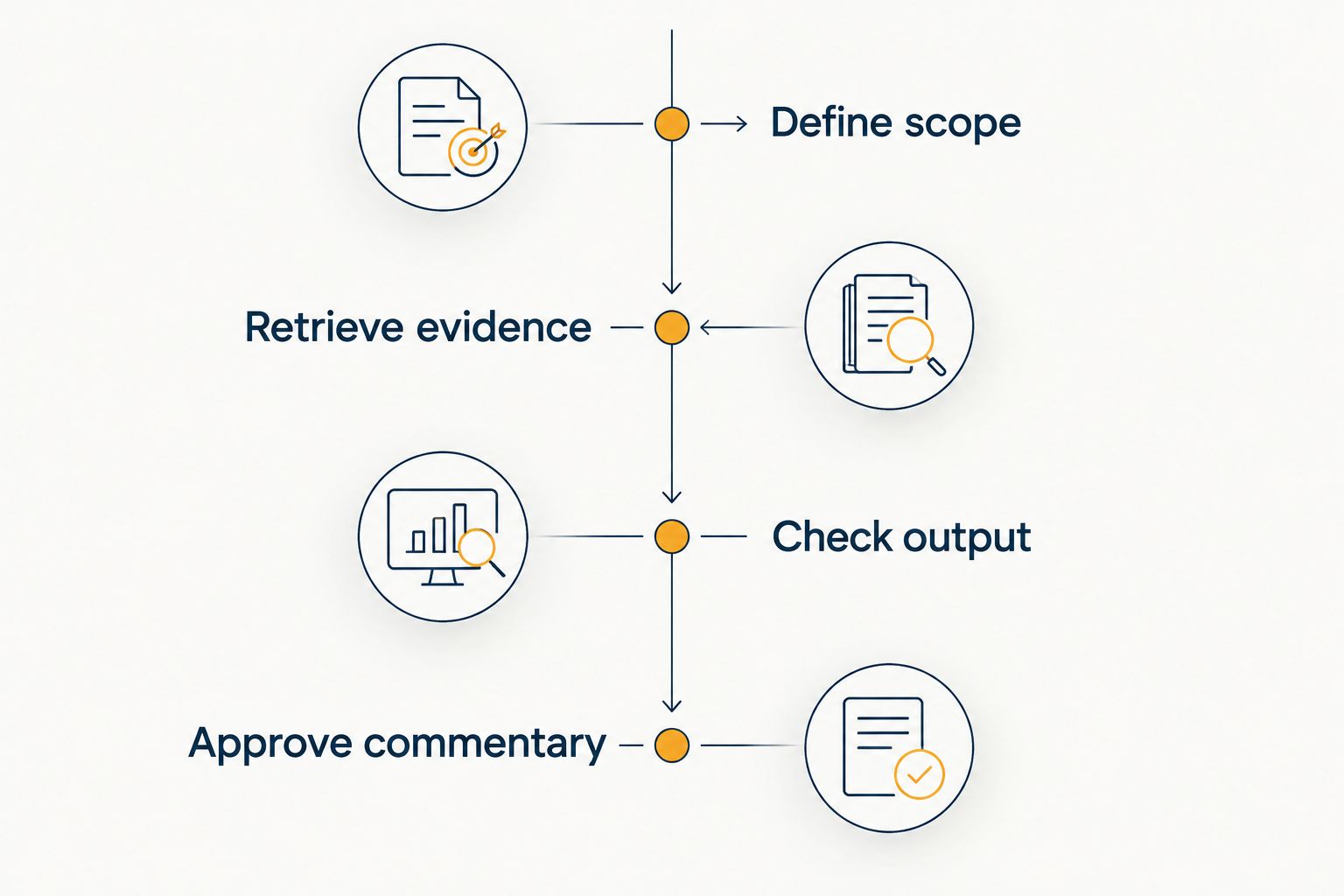
Follow this sequence:
- Define scope: Fix the entity, periods, scenario, currency, and relevant POV before asking a question.
- Retrieve evidence: Use the connected result or approved extract, preserving the labels needed for reconciliation.
- Check output: Reconcile figures and challenge every business explanation not supported by the input.
- Approve commentary: Have the reporting owner approve the narrative before it enters the management pack.
Repeat the same task after correcting an input. Check the table, explanation, and unresolved questions together: a corrected number paired with an unchanged narrative is still a failed result.
Also test an incomplete request. The assistant should expose an unresolved reporting choice rather than silently selecting an entity, currency, or period that changes the answer.
Which Oracle HFM reporting tool should you choose?
Choose EPM Copilot for connected HFM reporting questions. Choose Claude when the approved extract is the starting point, ChatGPT when the verified explanation needs drafting, and Microsoft 365 Copilot when the work belongs inside Excel.
Do not buy a writing assistant to solve a missing system connection. Equally, do not make a system-integration project the prerequisite for a narrowly defined commentary task.
Your 2026 decision should name the workflow being approved, its data boundary, and its reviewer. “Reporting assistant” is too broad an acceptance criterion.
FAQ
What's the best AI tool for connected Oracle HFM reporting?
EPM Copilot is the best fit on this shortlist for connected Oracle HFM reporting because its stated MCP server scope includes HFM. Validate the exact retrieval and operational tasks your reporting process requires before approving deployment.
Can Claude analyze an Oracle HFM report export?
Claude can help analyze supplied report information. Include the relevant dimensional labels, account definitions, and sign conventions; the uploaded material does not establish a live HFM connection.
Is ChatGPT a replacement for HFM reporting?
ChatGPT is not a replacement for HFM as the financial source of record. Use it to draft or explain supplied information, then reconcile its output against approved reporting evidence.
Does Microsoft 365 Copilot automatically connect Excel to HFM?
Do not treat Microsoft 365 Copilot's Excel assistance as proof of HFM connectivity. Establish the data retrieval route separately and evaluate the assistant against the workbook it actually receives.
How should finance teams test reporting accuracy?
Reconcile every output against an approved source using a fixed reporting POV. Test corrected inputs and incomplete questions as well as straightforward requests, and review numerical accuracy separately from narrative quality.
Can a reporting assistant explain why a variance happened?
A reporting assistant can summarize a supported explanation, but a numerical variance alone does not establish its cause. Supply confirmed drivers or require the output to identify the missing evidence instead of inventing an explanation.
What should IT review before approving an HFM assistant?
IT should review the connection architecture, identities, permissions, data handling, deployment settings, and permitted operations. Separate retrieval approval from permission to perform actions, and document the boundary for each workflow.
One last thing
Ask the assistant a deliberately ambiguous question: “Why did profit change?” Do not supply the entity, comparison period, or currency.
The useful result is not an immediate explanation. It is a request for the reporting context needed to produce a defensible answer. Make that ambiguity test part of your approval checklist before accepting a polished demonstration.