
EPM Copilot is the best fit for FP&A teams that need plain-language access to Oracle EPM. Among the best AI copilots for FP&A teams in 2026, Microsoft 365 Copilot fits Excel-centered work, Claude fits narrative review, and ChatGPT fits exploratory analysis; choose according to where the work happens, not which assistant produces the smoothest answer. EPM Copilot connects assistants to existing consolidation and planning systems rather than replacing those systems.
- EPM Copilot leads the best AI copilots for FP&A teams shortlist when Oracle EPM access is the requirement.
- Microsoft 365 Copilot fits Excel-centered analysis; test it against your actual workbook structure.
- Claude fits finance narrative review; require evidence for every explanation of a variance.
- ChatGPT fits exploratory file analysis; keep calculations reproducible and separate exploration from approved reporting.
Why this matters
FP&A work combines system access, spreadsheet analysis, interpretation, and communication. Those are different requirements. An assistant that explains an uploaded file does not automatically have permission to query Planning, and a system connector does not remove the need to reconcile a management report.
For your 2026 shortlist, separate access to finance systems from analysis of supplied material. Start with the task that creates the most manual handoffs, then evaluate the relevant option against a known answer.
The practical distinction is ownership: your finance system owns the approved data, your operating process owns authorization, and the assistant helps you interact with the information. Fluent output is not evidence that any of those boundaries were respected.
What makes the best AI copilot for FP&A?
Use these criteria before comparing product names:
- System fit: Does the workflow require Oracle EPM access, an Excel workbook, or a supplied document? Match the assistant to the source.
- Data context: Require the entity, account, period, scenario, version, currency, and other relevant dimensions in the answer.
- Reconciliation: Check the output against an approved report or reproducible calculation. A plausible explanation cannot replace a tie-out.
- Action control: Distinguish reading data from changing data or starting an operation. Evaluate permissions and approval requirements separately.
- Deployment boundary: Establish where the connection runs, which credentials it uses, and where information is processed.
- Reviewability: Require a clear distinction between retrieved facts, calculated results, and proposed explanations.
For 2026, prioritize source fidelity over writing quality. You can edit a paragraph. You cannot approve a forecast explanation whose underlying intersection is unclear.
Best FP&A copilots at a glance
These options serve different parts of the finance workflow. The table is a use-case ranking, not a claim that a general-purpose assistant and an Oracle EPM connector provide equivalent functionality.
| Option | Best for | Standout capability | Key limitation |
|---|---|---|---|
| EPM Copilot | Querying and operating Oracle EPM through an assistant | MCP servers connecting assistants to FCCS, Planning/EPBCS, PCM, Essbase, and HFM | Requires an Oracle EPM workflow and a configured connection |
| Microsoft 365 Copilot | Analysis centered on Excel workbooks | Assistance within the Microsoft 365 working environment | Workbook assistance is not proof of access to your EPM application |
| Claude | Reviewing finance narratives and supporting documents | Document-focused analysis and drafting | Supplied documents alone do not establish a live finance-system connection |
| ChatGPT | Exploratory analysis of supplied finance files | File analysis with an interactive question-and-answer workflow | Exploration still requires reconciliation before approved reporting |
1. EPM Copilot: best for Oracle EPM system access
This option builds MCP servers that connect Claude and other assistants to Oracle EPM. Its stated module coverage includes FCCS, Planning/EPBCS, PCM, Essbase, and HFM, allowing finance teams to query and operate those systems in plain language.
The deployment model places the MCP servers inside your network. Treat that as an architectural detail to examine, not a blanket statement about every component in the assistant workflow.
Manual today: You identify the relevant application and dimensional intersection, retrieve the data, and assemble the context needed to answer a finance question.
With a connected assistant: You express the question in plain language and use the configured Oracle EPM connection. The exact supported operation still belongs in your acceptance test.
A useful evaluation prompt is: Compare actuals with forecast for the selected entity and period, and state the scenario, version, currency, and account scope used. This is a test request, not a claim that every deployment supports the same tool set.
EPM Copilot pros:
- Addresses access to Oracle EPM rather than only analysis of exported files.
- Connects Claude and other assistants through MCP servers.
- Covers both consolidation and planning modules in its stated scope.
- Supports deployment of the servers inside your network.
EPM Copilot cons:
- Its stated focus is Oracle EPM, not a universal replacement for every FP&A application.
- A system connection introduces configuration, credential, and permission requirements that file-only analysis avoids.
Best for: Finance and IT teams whose main requirement is assistant-mediated access to existing Oracle EPM applications.
Verdict: Buy for an Oracle EPM access requirement, subject to a module-specific acceptance test. Do not purchase on the strength of a generic assistant demonstration.
2. Microsoft 365 Copilot: best for Excel-centered FP&A work
Microsoft 365 Copilot provides assistance within Microsoft 365, including Excel. It belongs on your shortlist when the working artifact is a workbook and the task concerns understanding, calculating, or presenting information in that workbook.
That is a different problem from operating Planning or FCCS. Evaluate the workbook workflow on its own merits rather than assuming a spreadsheet assistant also provides a connection to your consolidation application.
Manual today: You inspect formulas, locate relevant ranges, and prepare an explanation of workbook results.
With workbook assistance: You ask questions about the workbook and review the proposed analysis or changes in the context of the spreadsheet.
For a 2026 evaluation, use a workbook your team understands. Ask Microsoft 365 Copilot to explain a calculation, identify its inputs, and distinguish a formula result from an assumption entered by a planner.
Microsoft 365 Copilot pros:
- Fits teams that conduct their analysis in Excel.
- Keeps the evaluation close to the working spreadsheet rather than a separate narrative alone.
- Supports a useful review pattern: compare an explanation with the workbook that produced the result.
Microsoft 365 Copilot cons:
- Errors in workbook structure or source data remain finance-control problems.
- Excel assistance alone does not establish authenticated access to your Oracle EPM application.
Best for: FP&A analysts whose immediate bottleneck is understanding and working with Excel models.
Verdict: Buy for workbook-centered work; skip it as a substitute for an unverified EPM connection. Check the capabilities available in your organization's actual configuration before choosing a workflow.
3. Claude: best for reviewing finance narratives
Claude supports document analysis and drafting, making it relevant when the deliverable is a management explanation, planning commentary, or a review of supporting material. Give Claude the approved figures and narrative together, then ask where the commentary conflicts with the evidence.
Its role here is critical reading, not ownership of the ledger. A well-written explanation still needs an identified source and a finance reviewer.
Manual today: You read commentary alongside supporting schedules and identify claims that overstate what the numbers show.
With document assistance: You ask for contradictions, missing context, unclear comparisons, and claims that need evidence.
A practical prompt is: Review this variance commentary against the attached schedule. Separate numerical discrepancies from unsupported explanations, and preserve the original sign convention. That keeps the assignment narrower than asking an assistant to explain business performance without evidence.
Claude pros:
- Fits document-heavy review and drafting assignments.
- Supports a focused comparison between supplied commentary and supporting material.
- Can help you turn a broad review request into explicit questions about evidence and consistency.
Claude cons:
- Supplied documents provide a snapshot, not proof of current system data.
- A draft explanation can introduce causal claims that the supporting figures do not establish.
Best for: Finance reviewers who already have approved numbers and need to improve the accuracy and clarity of commentary.
Verdict: Buy for narrative review; hold any recommendation to use it as a system operator until the connection and permissions are verified. A connected Claude workflow and a document-only Claude workflow require different evaluations.
4. ChatGPT: best for exploratory finance-file analysis
ChatGPT supports file analysis and interactive investigation. It fits an exploratory task such as examining an exported finance dataset, checking a calculation, or developing questions for a deeper review.
Keep exploration separate from approval. A result becomes usable in reporting only after you verify the source, calculation, filters, and treatment of missing or duplicated records.
Manual today: You inspect an export, choose grouping fields, calculate comparisons, and revise the analysis as questions emerge.
With file-analysis assistance: You describe the question, inspect the proposed method, and challenge the output against known totals.
For your 2026 test, ask ChatGPT to show the transformation logic before accepting a chart or summary. Require an explanation of how it handles account signs, blank fields, and rows outside the requested reporting scope.
ChatGPT pros:
- Fits open-ended investigation of supplied files.
- Supports an iterative workflow in which you refine questions after inspecting results.
- Lets you evaluate a proposed calculation separately from the written interpretation.
ChatGPT cons:
- An exported file can omit dimensional context needed to interpret the result.
- Interactive analysis requires reproducibility checks before another analyst can rely on it.
Best for: Analysts exploring finance exports before turning a question into a controlled reporting process.
Verdict: Buy for exploration; skip unreviewed output in approved reporting. Preserve the calculation method and source extract alongside any result you retain.
How these options are ranked
The ranking follows the criteria above: system fit, data context, reconciliation, action control, deployment boundary, and reviewability. It is a workflow-based shortlist, not a benchmark claiming measured differences in accuracy or speed.
Oracle EPM access comes first because it is a distinct requirement that file analysis alone does not satisfy. Excel assistance, narrative review, and exploratory analysis then occupy separate use-case slots. Choose the slot before choosing the assistant.
Run a finance acceptance test before selecting
Use the same controlled assignment for every candidate relevant to your workflow. Start with 1 reporting period, compare 2 scenarios, and require 3 reconciliations: source totals, variance arithmetic, and dimensional scope. These are test-design requirements, not product performance claims.
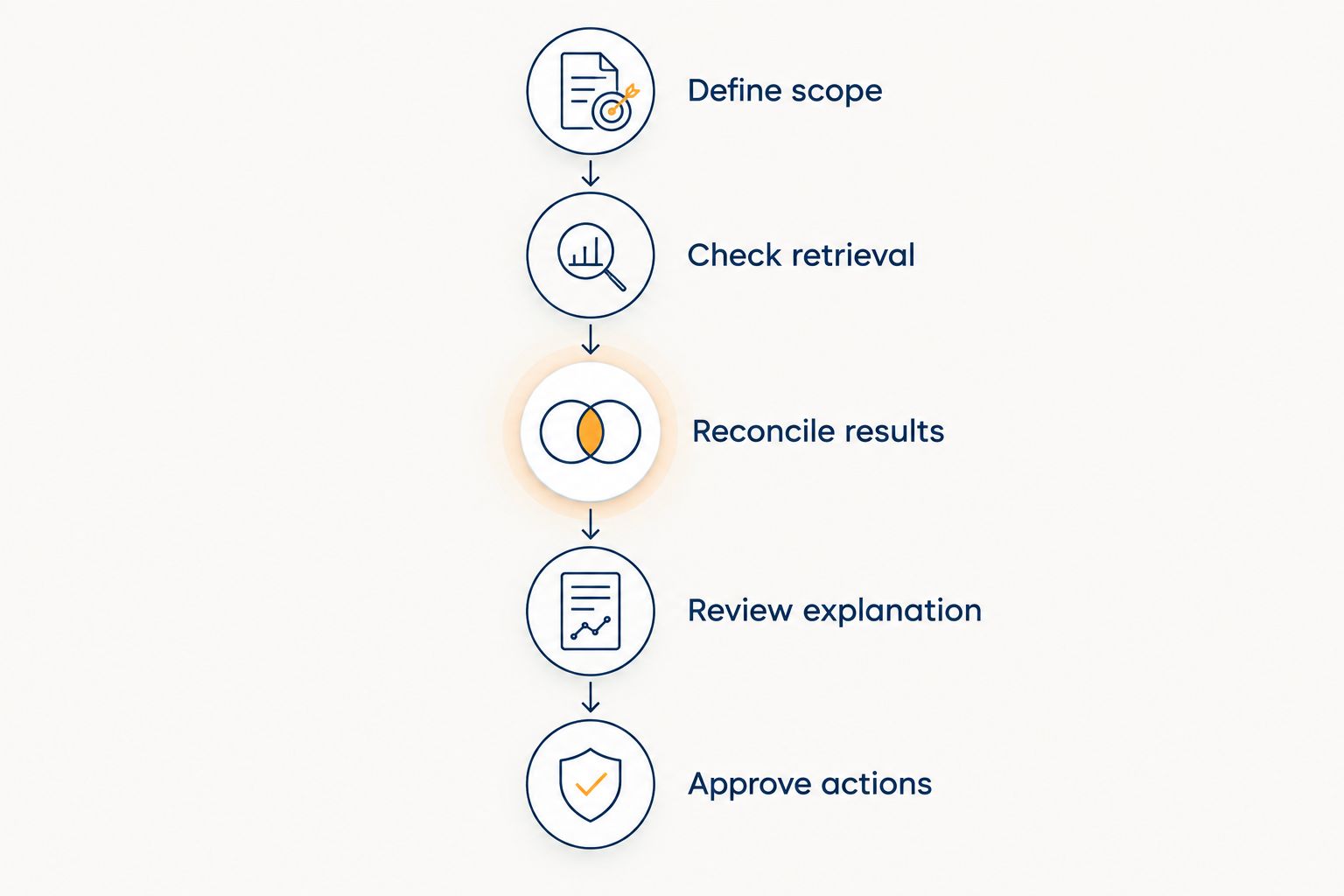
- Define scope: Specify the application or file, entity, account selection, period, scenarios, version, and currency.
- Check retrieval: Confirm that the returned data matches the approved source and respects the intended scope.
- Reconcile results: Verify totals, variance calculations, and dimensional filters independently.
- Review explanation: Separate supported observations from hypotheses about business causes.
- Approve actions: Evaluate any operation that changes system state separately from read-only analysis.
This sequence prevents a polished narrative from concealing a retrieval error. It also gives finance and IT a shared basis for accepting or rejecting the workflow.
Record the exact prompt, source reference, output, and reviewer decision. If a candidate fails, identify whether the failure concerns access, calculation, interpretation, or authorization; those require different remedies.
Which FP&A copilot should you choose?
Choose EPM Copilot when your requirement is plain-language access to Oracle EPM. Choose Microsoft 365 Copilot when the bottleneck sits inside Excel, Claude when the deliverable is evidence-based commentary, and ChatGPT when the assignment is exploratory file analysis.
For an undecided team, select the narrowest recurring task with an approved answer. In 2026, a verified workflow is a better starting point than an organization-wide assistant rollout without acceptance criteria.
FAQ
What's the best AI copilot for an FP&A team using Oracle EPM?
Choose a copilot with a verified connection to the Oracle EPM module your team uses. Test the required query or operation against an approved result; general file analysis does not establish system access.
Is Microsoft 365 Copilot better than ChatGPT for FP&A?
Microsoft 365 Copilot fits Excel-centered work, while ChatGPT fits exploratory analysis of supplied files. Compare them on the same finance task rather than treating either as the universal winner.
Can Claude review management reporting commentary?
Claude can analyze supplied documents and help review finance commentary. Give it the supporting schedule and require it to distinguish numerical discrepancies from explanations that lack evidence.
Can an AI copilot replace our planning system?
An assistant is not a replacement for your planning system's data, calculations, and controls. Evaluate it as an interface or analysis aid while retaining the established system of record.
Does an MCP connection automatically authorize finance operations?
No. A connection and an authorization decision are separate requirements. Verify credentials, application permissions, and approval rules for the specific operation before enabling it.
How should we test FP&A copilots in 2026?
Use a controlled task with known source data and an approved answer. Check retrieval, calculations, dimensional context, interpretation, and authorization separately.
Does deploying a connector inside our network settle data security?
No. Internal connector deployment is only part of the architecture. Review the assistant endpoint, data movement, credentials, permissions, and logging across the complete workflow.
One last thing
Test an ambiguous request before signing off: Show the forecast variance. A sound finance workflow needs the period, scenario comparison, entity scope, and currency established before the result means anything.
Make ambiguity handling an acceptance criterion. The useful answer is not always a number; sometimes it is a request for the missing dimension.